Is a perfect black box room required for the theater experience at home? No. Projectors can be angled because designers account for consumers with imperfect rooms. By tweaking the Keystone Correction, a projector can be used at an angle. Advanced projectors have lens-shift technology that automatically adjusts. Check whether the projector relies solely on digital keystone correction or includes features such as optical lens shift.
Is a Perfect Room Setup Required to Utilize the Projector?
No. The ideal placement for the projection is the center, but it can still work well at other angles. A projector can be placed at an angle without affecting image quality, because most of us don’t have a perfect home theater setup.
Modern projectors can also be used for side projection using Digital Keystone Correction and Optical Lens Shift. This allows the projected image to align with the angle of the wall and the placement of the projector, whether it is on a side table, a high shelf, the ceiling, or the floor, and still achieve a rectangular image. With this advanced technology, it is easier to fit a larger screen than a TV in a confined space, and the screen size can be adjusted.
Understanding the Tech Difference: Digital Keystone Correction vs. Optical Lens Shift Movement
Projecting an image at an unusual angle often distorts it, making the screen shape non-rectangular. To fix that, the projector either supports keystone correction or optical lens shift.
How does Digital Keystone Correction (Software) in Projectors Work:
When it is tweaked, the image digitally gets squeezed into a trapezoidal shape by the projector. When that image is inverted, it appears rectangular.
- Pros: Keystone correction lets you digitally adjust the projector's angle. It enables you to project an image at a relative angle, like a side-projection projector.
- Cons: Image resolution decreases due to additional processing and fewer pixels. It leads to additional artifacts, such as blurring and gray, faded edges.
How does Optical Lens Shift (Hardware) differ from Keystone Correction:
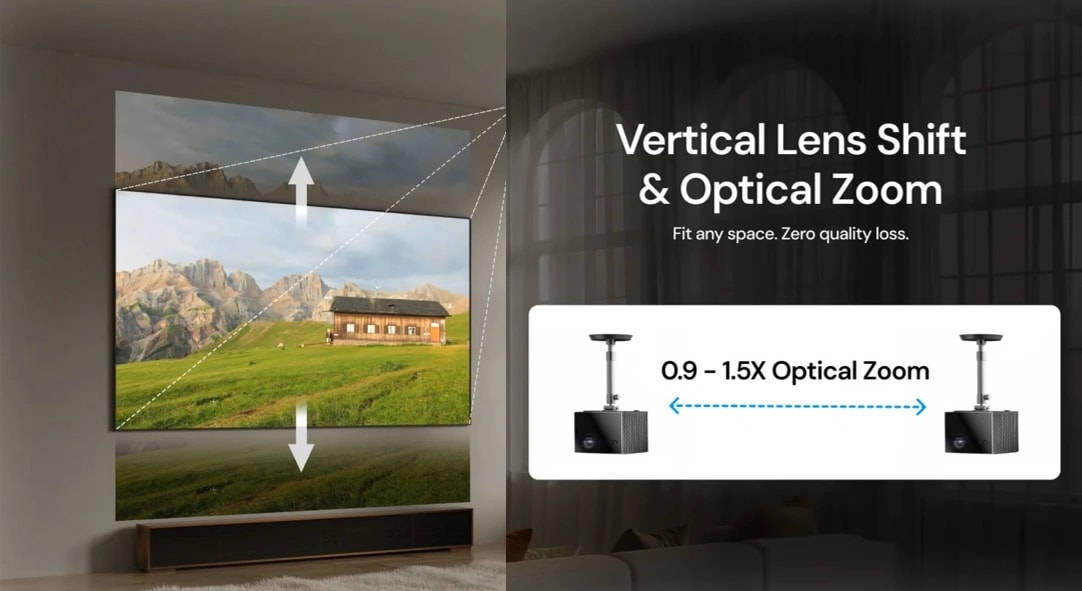
Optical lens shift differs from digital keystone correction because the projector's physical lens shifts up, down, or sideways, depending on the projection screen's position within the projector's housing, to project images at any angle.
- Pros: Due to lens movement, image quality is unaffected, and the projector can work even at extreme angles relative to the screen. So there are no artifacts. VisionMaster Max is one of the few lifestyle projectors in its class to offer vertical lens shift technology for a sharp, detailed image.
- Cons: Projectors with optical lens shift technology are more expensive than projectors with Keystone Correction technology.
How to Use a Projector at Different Angles?
Most common projection angles range from horizontal to vertical. Projection can be aligned accordingly by tweaking the keystone correction or the lens dial, which are found in almost every projector.
- Scenario A: Vertical Projection Angles (Ceiling or Coffee Table): When a projector is placed on a flat table, it doesn’t usually project straight but rather at a slight upward angle towards the ceiling. When mounting the projector to the ceiling, the recommended angle is slightly tilted towards the floor to align with the projection screen without keystone correction.
Solution: Open Display Settings or Picture Settings of your projector. Then navigate Keystone or Keystone Correction settings and select the Vertical option or Vertical Lens Shift.
- Scenario B: Horizontal Projection Angles (Side Projection): Whether the projector is placed on the nightstand for movie night or used for side-throw projection, the projected image can be centered by correcting the horizontal Keystone.
Solution: Open Display Settings or Picture settings of your projector. Then navigate to the Keystone or Keystone Correction setting and select 4 Corner Correction or Horizontal Keystone. Usually, 4 Corner Correction is challenging to make an image perfectly rectangular. Its temporary alternative is digital correction for quick use.
Does Projecting at an Angle Affect Image Quality?
The common misconception when considering projecting at an angle is that it compromises image quality or results in a weird projection screen. This is usually the case when extremely correcting the projection screen digitally. Check against the following list to confirm that image quality is affected by the projector’s angle.
- The “Gray Border” Effect: The gray border appearance around the projected screen is due to extensive use of the Digital Keystone Correction. It causes unused pixels to appear faint gray.
- Focus Uniformity: One part of the screen is clear while the other lacks details and sharpness because the projector’s angle is too steep, such as more than 30 degrees.
- Gaming Latency: Input lag is also affected by heavy Keystone Correction. This usually affects gaming sessions and projectors that don’t have a high refresh rate to compensate. To fix this, move your projector toward the center to reduce Keystone Correction or use Optical Lens Shift technology, which is built into Valerion VisionMaster Max with a 120+ refresh rate for a smooth gaming experience.
Pro-Tip: To fix the effects of using a projector at an angle, move the projector a few inches towards the angle of projection.
What to Look for in a “Room-Friendly” Projector
To determine the best projector for your room, it comes down to three features.
- Feature 1: Auto-Correction: Check whether your projector has a ToF (Time of Flight) sensor before purchase; it is essential for automatic focus, eliminating the hassle of manual adjustment and ensuring all four corners of the image are sharp. Valerion is one of the few to offer this in its entire line-up.
- Feature 2: Optical Lens Shift: Enjoy 4K image quality while using a projector at an angle with Digital Keystone Correction technology. None of the artifacts is visible with Lens Shift projectors, either. Models like the VisionMaster Max utilize this optical tech to ensure the image is not distorted when projected at an angle.
- Feature 3: High Brightness: When using a projector at an angle, higher brightness is required because the throw distance is longer. High brightness compensates for the longer throw distance.
3 Tips for Setting Up a Projector in an Awkward Space
A projector can be positioned at an angle for use, but image quality shall not degrade. By following three simple tips, a projector can be used in an awkward space at an awkward angle.
- Tip 1: Always consider moving the projector first before the Digital Keystone Correction. This gives you extra room to adjust without introducing artifacts of the Keystone Correction.
- Tip 2: Use the Grid pattern to test if your projection screen is rectangular. To enable the Grid pattern, open the Menu and search for System Setup. Then navigate to the Projector Installation setting. Now select the appropriate installation mode based on where your projection screen is.
- Tip 3: If possible, don’t exceed your projector angle by more than 20-30 degrees.
Conclusion
Can a projector be placed at an angle without affecting image quality? Yes. A room's shape is not a barrier to projectors, as they are designed for vivid projection angles. To make the projector work at an angle, its lens or keystone must be corrected. However, an extreme Keystone Correction will degrade image quality, unlike Optical Lens Shift.
Keystone Correction vs Lens Shift projector, which is better? Keystone Correction is found in low to mid-tier projects. Advanced lens shift is reserved for high-end projectors. It enables you to enjoy full resolution without compromising the high refresh rate. Check out the flexible 4K lifestyle projector specs to see whether your projector is one of them.