



Valerion VisionMaster Pro2 レビュー – 良いものは本当に小さな筐体に収まるのか?
January 17, 2025
Starvos による
はじめに
RBG laser engines made their consumer debut in UST projectors several years ago and have become a huge player in the projection market. Many home theatre enthusiasts who were accustomed to standard throw projectors made the switch, being enticed by the many advantages these tri-laser projectors offered-the main one being the significantly expanded colour gamut without the need for lumen-robbing special filters. However, the main trade-off to switching to a UST was the loss of the placement flexibility that most standard throw projectors afford.
With the passage of time, there have been continual advances in the picture quality of these trilaser USTs, and as many of us watched model after model being released, many enthusiasts, me included, were wondering, “Are we ever going to see this light engine and its refinements incorporated into a traditional, standard throw projector?” A testament to this pent up demand is how much buzz the Valerion VisionMaster series has garnered on the AVS Forum(not to mention its immense success on its Kickstarter page). Not that the Pro2 is the first traditional throw tri-laser projector to hit the market; however, on paper, it sure does look like it has the potential to be the best one yet.
I have been closely following the AVS Forum thread from day one, and thanks to some early reviewers(whom we should all be thankful to, the likes of Nikos(Projektor Junkies)-shared early results of the Plus2, Peter(@FenceMan)-has tirelessly gone above and beyond to answer all our questions, and Rob(from the Hook-up-anticipation of his exhaustive comparative videos turn us into little kids impatiently waiting for Santa on Christmas day), it would appear that indeed, the Pro2 is a very special projector. The review to follow is intended primarily for the AVSForum audience, as I try to focus on areas that matter most to this very dedicated community.
Finally, I just wanted to disclose that I am not a professional projector reviewer, You tuber, or social media influencer (and also am not financially affiliated with any electronics company)-- I am an optometrist by profession, always in the pursuit of the best vision for my patients. Achieving our ultimate potential when it comes to vision has always been my passion. This carries over to my decades old pursuit of the ultimate theatrical image and trying to squeeze the best out of any display device that our retinas are to behold. And this is my intent with the Pro2—and thus would like to thank the team at Valerion for being so kind and sending me a sample of the Pro2 to review. My mission is to provide fellow enthusiasts with a thorough armamentarium of objective measurements, followed by honest, unbiased subjective observations.
My set up is a 150” Elite 16:9 Cinetension White unity gain screen. The measuring devices that I used are an X-rite Colormunki Photo spectrophotometer(High Resolution Mode) for colourimetry and a Sper Scientific 840022 light meter for contrast and lumen measurements. The software used is HCFR. A Sony UBP-X700 fires up the test patterns, and a Sony NEX-3N does duty for the photos.
より近く、より身近に
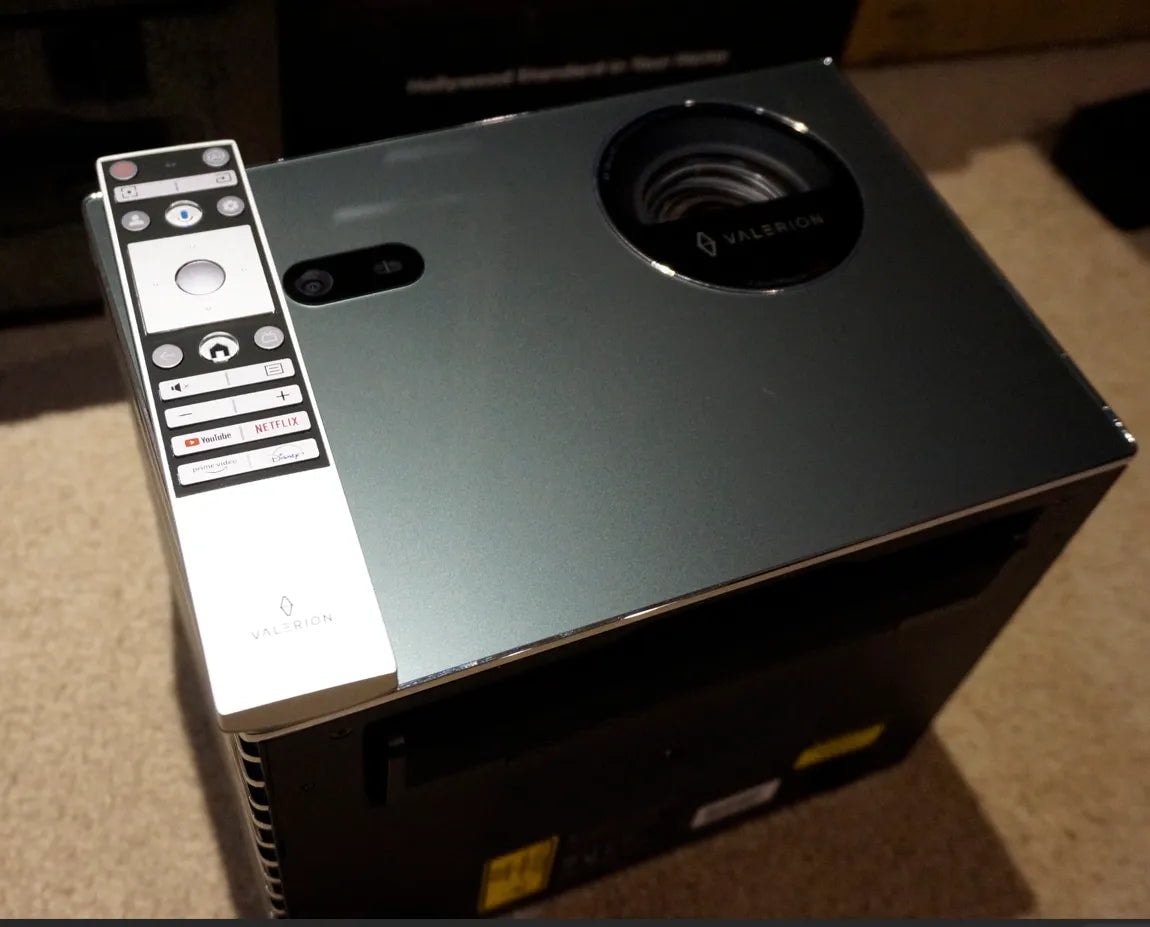
The Pro2 arrived very securely packaged in not only double cardboard, but also in a unique, slick carrying case-not so important for those who will ceiling mount the Pro2; but for those planning on having it serve multiple duties, the carrying case is a nice touch. As anticipated, in that cool case fit the Pro2, separate power supply, remote, and a multi-language user manual, all packaged efficiently to fit in the case. A few things to note-interesting to see the power supply external from the projector-perhaps to decrease heat and thus fan noise inside the projector, and should it fail, it would prove much easier to replace. The remote(both blutetooth and IR) is nicely crated, with an upscale aluminum front, with several back lit buttons-a small detail, but welcomed for sure by enthusiasts. It fits comfortably in the hand, thanks to a gentle convex backside. For those worried about line of sight issues with the remote, the team at Valerion has included an innovative Bluetooth wakeup feature in the projector. This means that Bluetooth will remain powered on and actively broadcasting even when the projector is turned off. Thus, the Pro2 can be turned on, even without line of sight. Finally, please note that the unit sent to me is an Engineering Sample, as witnessed by the attached labels.
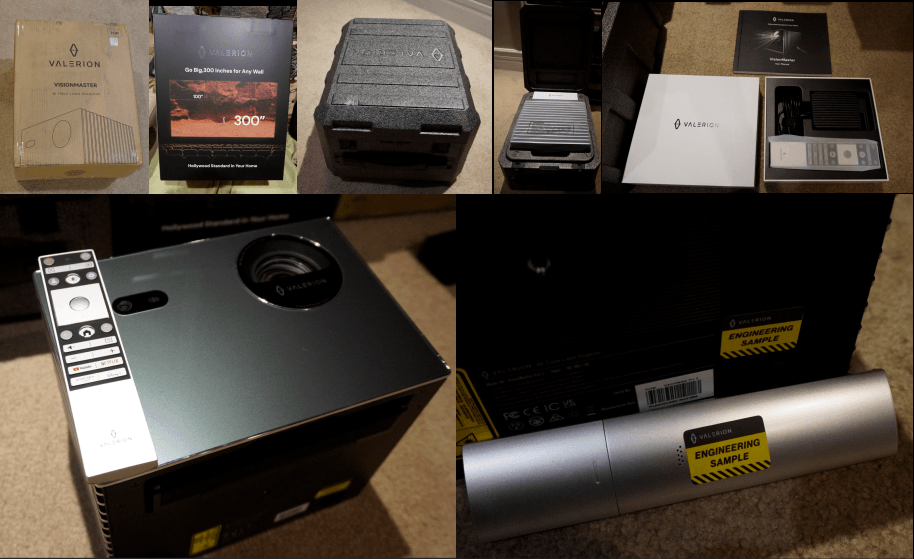
The projector itself, though not resembling a typical home theatre projector in size and shape, is very aesthetically pleasing; so much so that it caught my wife’s eye as a thing of beauty, something she would have no issue putting even in the family room. Needless to say, this compliment of high praise has never befallen any of my previous projectors(bodes well for all worried about the WAF). Though it is quite a small cube size-wise, it does carry a hefty weight, hopefully promising good things inside too. The glossy front panel is a beautiful Elegant Grey colour, not quite black, but close enough for those who prefer it to disappear in their bat cave.
The initial boot up time is about 38 seconds. Subsequent start-ups harness full laser power in about seven seconds-gone are the days of waiting and waiting for bulbs(and even tubes) to warm up. It runs on the Google TV platform, with all usual apps, bells and whistles. Responses from the remote are instantaneous, with absolutely no lag in navigation. As far as placement goes, the 0.9-1.5 throw ratio powered zoom lens provides a good amount of flexibility. The Pro2 is the first projector I have owned with zero vertical offset—I suspect to allow it to be placed low/on the floor(as it has its roots as a Lifestyle Projector). As I am sure most reading this review are aware of, the much anticipated Max will greatly enhance vertical placement as it will include a generous amount of vertical lens shift. For those not too worried about ‘digital image adjustments’, the Pro2 is endowed with front sensors that can automatically place (and focus) your image inside your screen—for those looking for plug and play, I am sure it will put a smile on their face. However, those of us who prefer to avoid digital interference, full manual controls are on board too.
LENS/FOCUS/SHARPNESS
Speaking of focus, a button on the remote calls up the auto focusing procedure and afterwards, allows fine tuning from the remote to dial in the focus optimally(the auto focus mechanism gets you either spot on, or very close to it) Though the lens ‘only’ has a 40mm diameter, the fabricator(s) deserve high praise. The images it produces are among the sharpest I have ever seen(at both 0.9 and 1.5 TR). As you are all aware, the corners are the toughest to keep tack sharp, as aberrations more readily rear their ugly head as we move to the periphery. There is an ever so slight hint of softening in the corners which is unresolvable by our visual system at any proper viewing distance. The same can be said for chromatic aberration(CA)-as I have tried to show in the photos, it was exceedingly minimal, and also not an issue at all at typical viewing distances. The combo of this exceptional lens with what must also be exceptional image processing render an image that is super sharp and detailed, devoid of any noise. I was also impressed at the level of delineation of my 2160TVL pattern(vertical shown below)-the best rendering that I have ever seen to date(from an XPR projector). A final note; in the Projector settings, the option labelled ‘Ultra Sharp Mode’ turns the XPR actuator off and on, allowing one to choose between native 1080p and 4K.
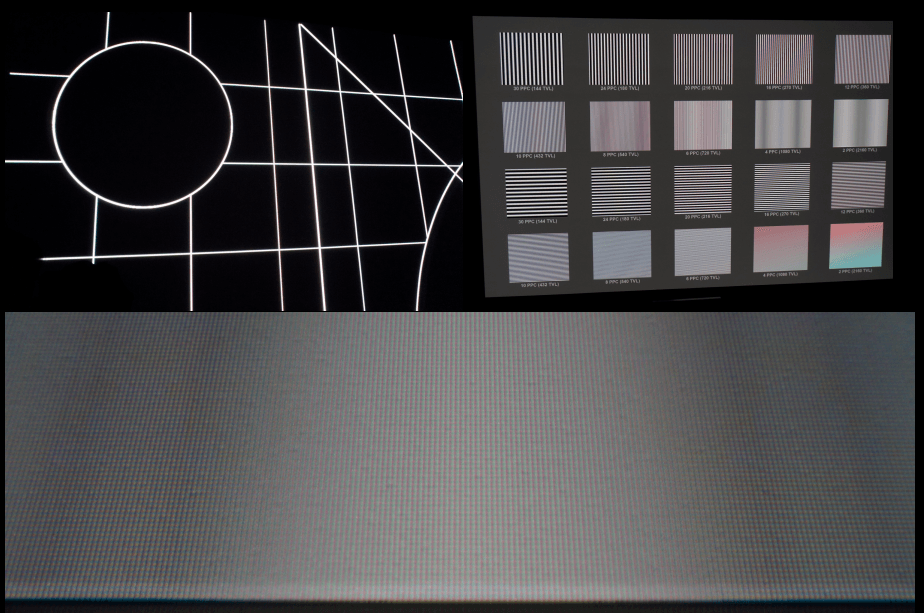
モーション処理ホームシアター愛好家にとってうれしいのは、Valerion が Pro2 に 3:2 プルダウンなしで 24p を表示できる機能を搭載していることです(下のクリーンなパターンからもわかるとおり)。ほとんどの 0.47” DMD XPR プロジェクターは、4K 60フレーム/秒(60P)に固定されています。そのため、24P を 60P に変換する際(3:2 プルダウンが必要なため)にジャダーが発生することがあります。60p 未満のフレームレートでの動きのカクつきを抑えて、さらに映像をなめらかにしたい方のために、Pro2 には複数のモーション補間(MEMC)設定が用意されており、なめらかさやブラー低減の度合いをカスタマイズできる項目もあります。このシステムは、動きをなめらかにするために実フレームの間にフレームを知的に挿入します。
虹色現象– 私はRBEにそれほど敏感ではありませんが、「問題」となるシーン(暗いシーンに小さな明るい物体がある場面)では時折気づきます。Pro2でもRBEは多少見られますが、非常にわずかです。RBEに非常に敏感な方を除けば、ほとんどの方にとって問題にはならないと思います。
スペックル & ノイズ– 光源にトリプルレーザーを使用するプロジェクターは、斑点のように見えるスクリーンアーティファクト(レーザースペックル)が生じやすい傾向があります。発生の程度はレーザーとスクリーンの種類によって異なります。私の平面ホワイトでわずかにテクスチャのあるビニールスクリーンでは、目視できるレーザースペックルは確かにありませんでした。映像ノイズについては、すでに述べたとおり、10’の視聴距離ではまったく判別できず—映像は非常にクリーンでした。
ファンノイズが聞こえる –Pro2 は非常に静かで、私の視聴距離 10’ ではほぼ無音です。1 m の距離で最大動作音は約 30dB と計測しました(レーザー輝度は最大-10)。
3D –立体視は驚くべき現象です—左右の眼が受け取る像の差異(視差)を利用して、脳は2つの二次元画像から三次元空間を構築します。この事実を利用して動作するのが3Dプロジェクターです。しかし、画面上の視差から3D映像を生成することは、私たちの両眼視機能に負担をかけ、視聴者の中には目の疲れ、頭痛、さらには吐き気を感じる人もいます。残念ながら私もその一人なので、3D視聴は避けるか最小限にとどめています。(3D愛好家の皆さまには申し訳ありません。)とはいえ、Valerion は3Dの実装を引き続き洗練していると考えており、いずれその件についてさらに多くの情報が得られるはずです。
USB サポート-うれしいことに、NTFS ドライブに対応しています。内蔵の Media Player アプリは、試したファイルをすべて再生し、動画も音声も問題ありませんでした。多くの愛好家は、好みの外部プレーヤーをいくつか手元に用意していて、それらを使うことを好むのではないかと思います。そのほうが内部の処理能力を解放し、より軽快な画像処理に回せる可能性があります。
ゲーミング –私はゲーマーではないが、Pro2 はゲーマーにも評価されるだろう。特別なターボモードを搭載し、入力遅延は 1080p/240fps で 4ms、1080p/120fps で 8ms、4K/60fps で 15ms としている。
CMS とグレースケール調整– 完全なCMSが搭載されているのを確認できてうれしかった(2ポイントおよび20ポイントのグレースケール調整、さらには20ポイントのガンマキャリブレーションも含む)。画像を細かく調整したい方のために、Valerionはそれを実現するための必要なツールを用意しています。
実際の数値
ANSIルーメン & 均一性
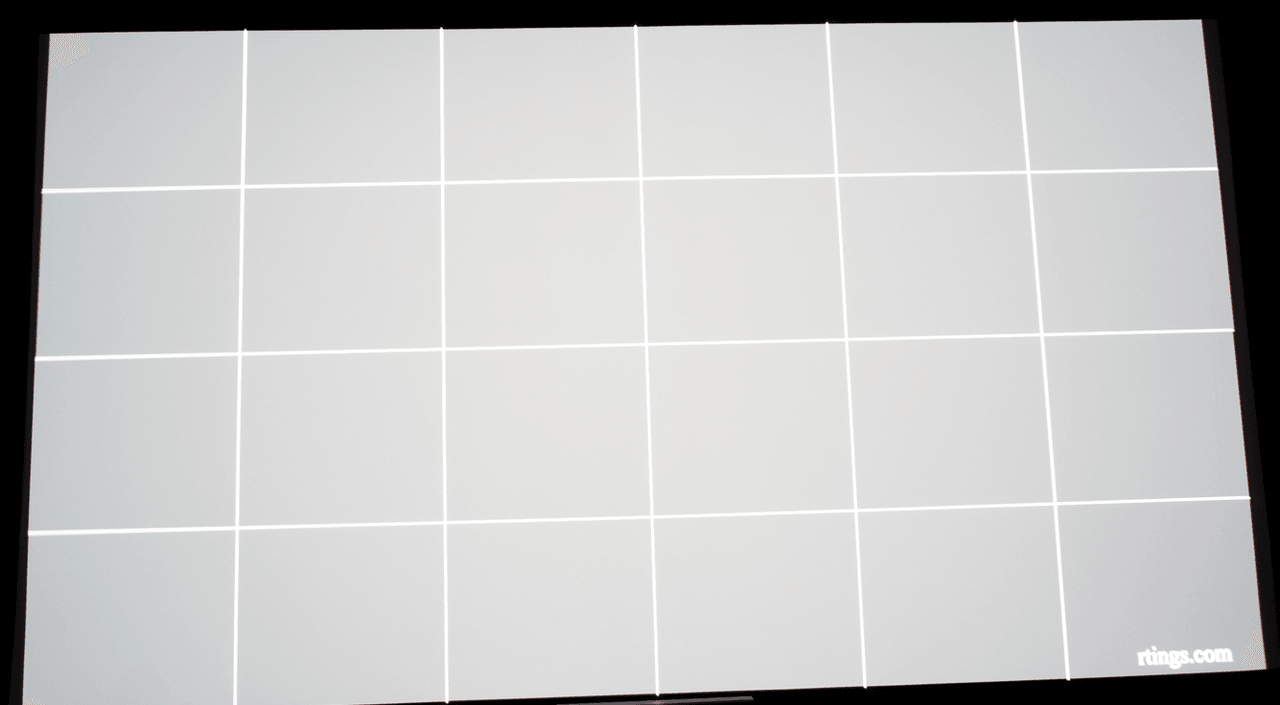
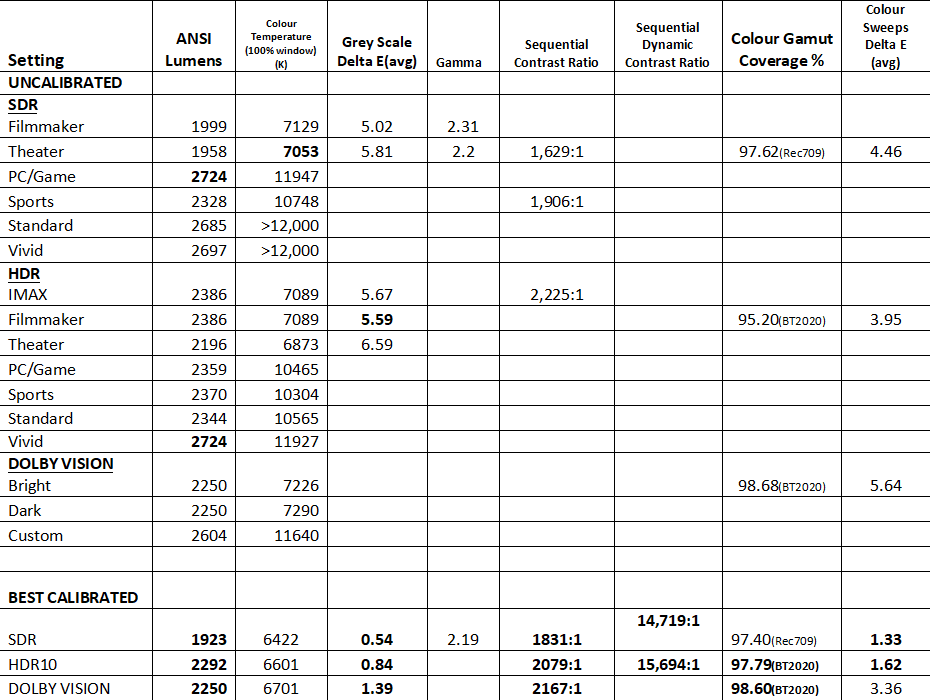
Valerion rates the Pro2 at 3,000 ANSI lumens, and although in the chart above, the maximum reached was 2724, the Pro2 achieved 3024 maximum ANSI lumens by setting the Brightness Enhancer to High in the HDR Vivid mode. However, this mode induces an unsightly green cast to the image, rendering it unusable. Fully calibrated, almost 2300 lumens remain—an excellent showing. Effectively, this nets you around 115 nits on a 150” screen, and roughly 275 nits on a 100” screen(unity gain, 16:9), All of the above measurements were taken with the Laser Luminance level set to its max, 10. The lens position was at its longest throw position, 1.5. Moving the projector as close as possible to the screen, at its 0.9 throw, brought an approximate 9% gain in lumens. In terms of screen uniformity, there was only about a 100K difference from top to bottom of the screen, which is imperceptible. Luminance uniformity came in at around 91.7%--a fantastic result. Overall screen uniformity is superb.
コントラスト
As mentioned, the Pro2 uses TI’s 0.47” DMD device with XPR technology to derive its 4K resolution. The typical sequential contrast these DMDs produce in standard throw projectors is around 1,000:1(with the best USTs having reached over 3,000:1). And so, the 2,167:1 achieved in best calibrated DV is a commendable accomplishment. However, that number is still relatively low when we compare it to other imaging technologies. Fortunately, to immensely improve low ADL scenes, Valerion includes an aggressive dynamic dimming technology which they name EBL(Enhanced Black Level). Using intelligent algorithms to scrutinize scene brightness levels, instantaneous laser dimming along with gamma manipulation is used to “shift the scene's contrast across more of the projectors native contrast range.”(thank you @SirMaster) As the name suggests, it truly does enhance black levels, as witnessed by the ~15,0000:1 dynamic contrast ratio achieved, and the myriad of comparisons already on the forum—and a few more below. A few final notes-in order to eliminate the EBL system during sequential contrast testing, I used a single lit pixel pattern. A quick/modified ANSI contrast measurement at the lens(luxmeter as close to the lens as possible, sensor inside one of the checkerboard squares) yielded a 300:1 value—which is what I believe is the maximum measured for a 0.47” DMD. And finally, I used @PixelPusher15’s(thank you!) low ADL patterns to test low ADL contrast. My room is only partially treated, so measurements at the screen do not mean much and so I have not posted them. However, I will say that the results tell us that when I tested the Pro2 with EBL on, EBL was NOT active in any of those patterns, likely remaining absent due to the presence of 100 percent white in the patterns. And finally, in HDR10 best calibrated mode, the contrast ratio at 1.5 throw was 2079:1, as stated above, and dropped to around 1600:1 at the shortest 0.9 throw ratio—as is expected, at 0.9 throw, we gain lumens but lose contrast.Dynamic laser dimming technology(and dynamic iris technology) have been around for a while and I have often wondered why they are not more aggressively implemented, particularly in projectors with relatively low contrast ratios. I commend Valerion for taking up the challenge to try to implement such a system optimally—aggressive enough to transparently lower black levels while not clipping highlights, on a scene by scene basis. Though this is not a ‘direct’ replacement for native contrast, it really is a game changer. Native contrast will always be king, and should be sought after. However, when up against hardware limitations, such as those imposed by the 0.47” DMD, systems like EBL allow the Pro2 to produce impressive black levels(as you know, a photo cannot perfectly recreate the projected image the eye sees--all comparison photos are taken with the same shutter speed/aperture/ISO and white balance to attempt to preserve accuracy):
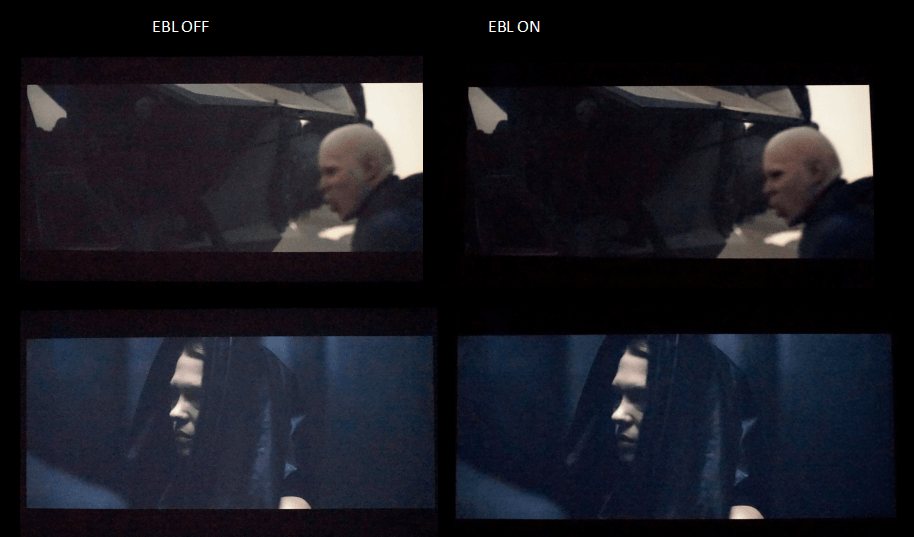
I believe these pictures speak for themselves, similar to many we have seen posted in this thread. With EBL on, in low APL scenes, blacks become so much deeper, with the retention of shadow detail. By eliminating that haze or dullness associated with these challenging scenes on lower native contrast projectors, the picture takes on a whole new look. Essentially, EBL ‘saves’ those scenes from otherwise having to ‘grin and bear’ them. Mid to high APL scenes have always been DLP’s strong suit, and so EBL helps solve that Achilles’ DLP heal. Dimming all three lasers at the same intensity across the power spectrum is no small feat—if not done properly, changes in colour temperature can be noted and thus very distracting. Valerion has done a great job here; I never once noticed an obvious change from scene to scene, regardless of how drastic the APL change was. Out of curiosity, I measured the grey scale using my EBL off SDR best calibrated settings with EBL on, and the 100 IRE was 6214, the average delta E being only 1.68:
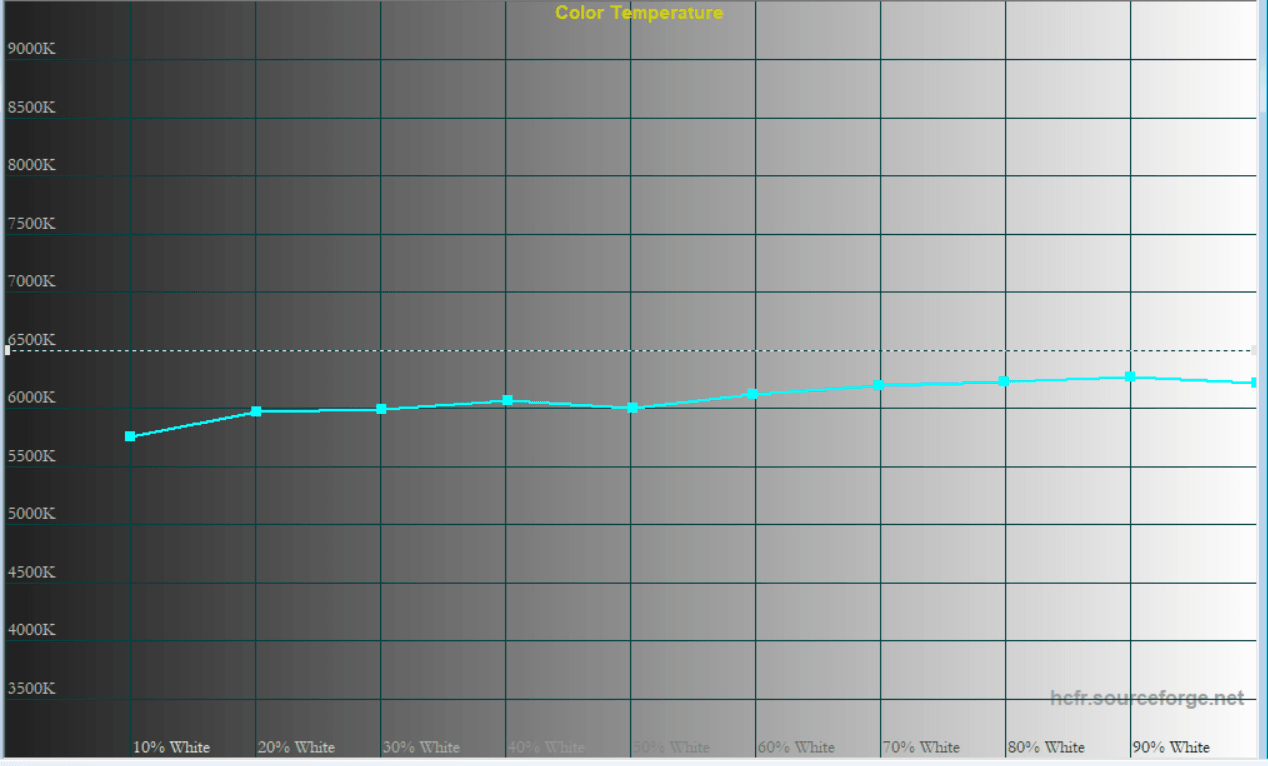
As you know, ダイナミックディミングシステムが引き起こしうる主なアーティファクトは、輝度レベルの変化に伴う目に見えるポンピングと、前述のハイライトのクリッピングです。Pro2 の EBL 実装は模範的ですが、ごく稀に(どこを見るべきか分かっていれば)わずかなポンピングが検知できることがあり、また、クリッピングも(同様に、どこを見るべきか分かっていれば)確認できることがあります。正直なところ、私はクリッピングに敏感で、特に「自然な領域」、とりわけ顔のディテールで発生した場合に気になります。こちらが実際のクリップです:
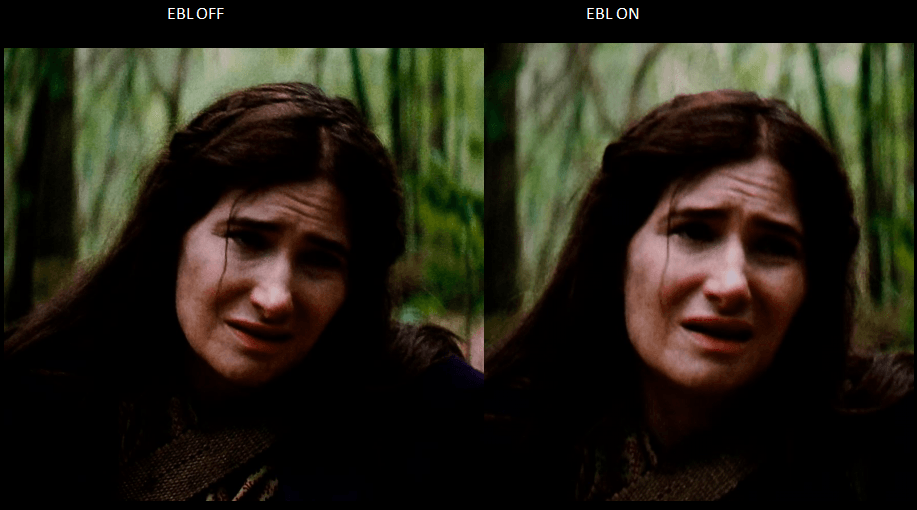
A close look at the tip of Agatha’s nose, and one can see some clipping—it was a little more obvious on screen than it is in the photos. This has been reported to Valerion to help improve their algorithm. I believe we have been told that they are working on selectable EBL levels—something enthusiasts would appreciate.
That being said, the above shot was taken from the last episode of Season 1 of “Agatha All Along-Dolby Vision” (as my daughter is a big Marvel fan, any time I can spend with her watching in our home theatre together is a win!). The first seven minutes or so sees Agatha wandering through a shadowy forest. Minor clipping aside, the entire scene was rendered spectacularly. So much so that my daughter leaned over to me half way through to say, “Dad, this projector is so life like”. After that comment, and out of curiosity, I turned on my current projector(also a 0.47” XPR trilaser, CR~1:700:1, no dynamic laser dimming), brightness matched them(!) and did a comparison:
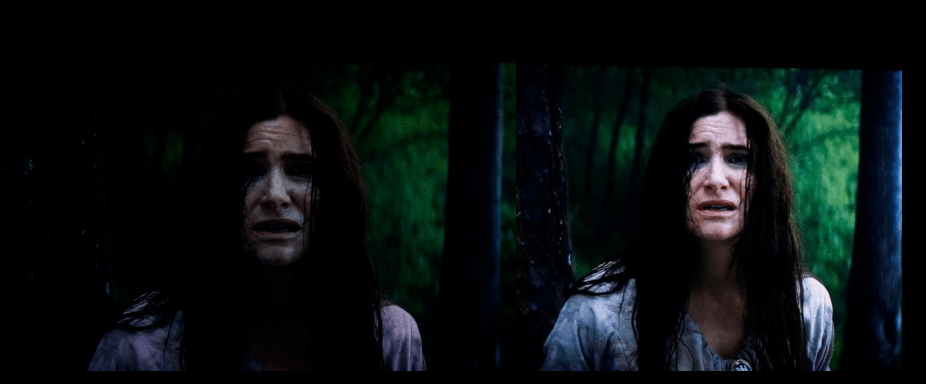
娘の言うとおりでした。どの写真がValerionかを示すラベルを付ける必要も、コメントを添える必要もありません。写真自体がすべてを物語っていると思うからです。
グレースケール/測色
予想どおり、プリセットモードはいずれも完全に正確というわけではありませんが、Valerion は(繰り返しになりますが、これはエンジニアリングサンプルです)より明るい(精度は低い)モードを周囲光のある環境での視聴向けに、より正確なモード(Filmmaker と Theater)をより厳密な視聴向けになるように設定しているようです。もちろん、愛好家はユニットをさらにキャリブレーションしたくなるでしょう(そうすべきです)。その労力に見合う優れた結果が得られます。
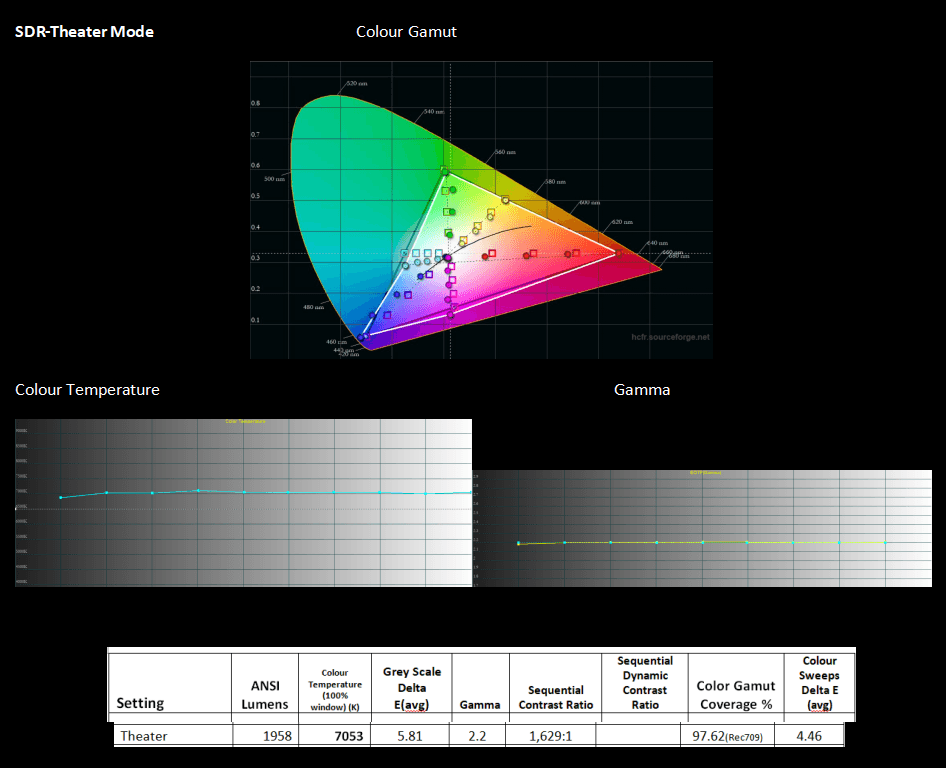
完璧ではないものの、このモードは初期設定のままでも多くのユーザーにとって十分な精度でしょう。
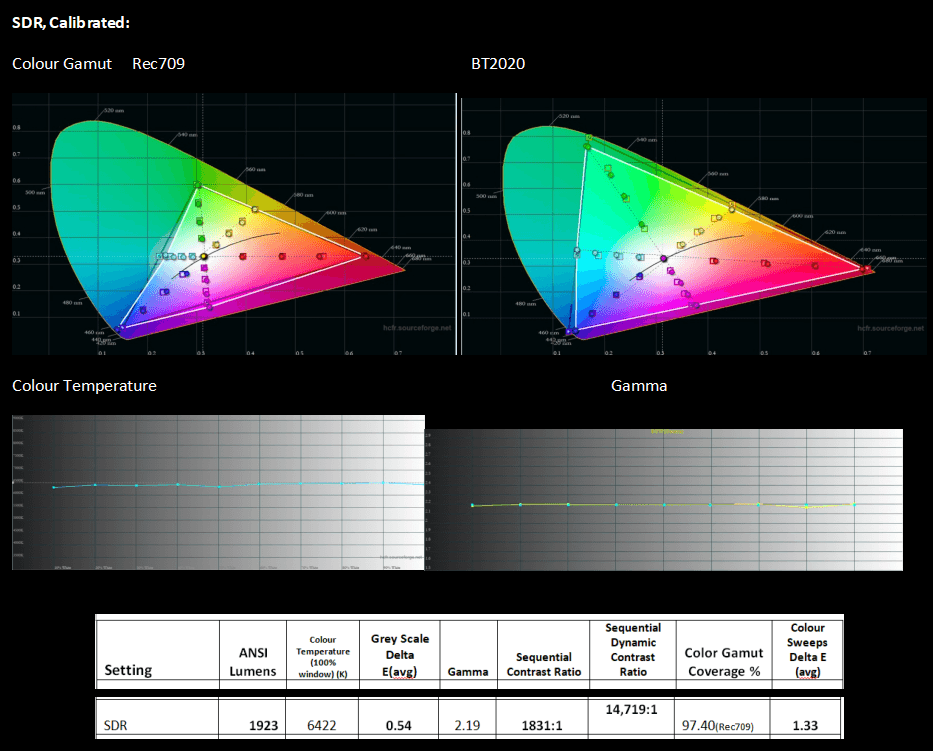
ここでの結果は非常に良好で、両方のグレースケールのカラースイープにおいて Delta E が非常に低い値です。さらに、BT2020 SDR を Pro2 に入力する方は、上のグラフに示されているとおり、フル色域と高い色精度を得られます。Pro2 には適切に機能する Color Space 設定があり、SDR で希望する色空間を選択できることを確認できてうれしかったです。
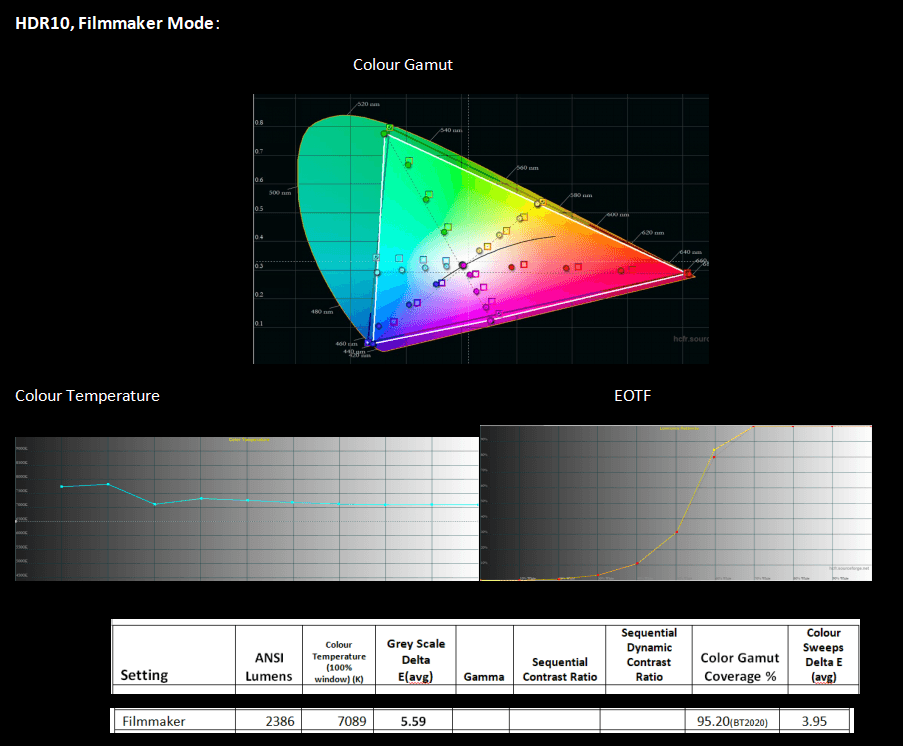
結果は未調整のSDRに近い見え方です—完全に合致しているわけではないものの、このモードは開封直後でも多くの方にとって十分な精度と思われます。
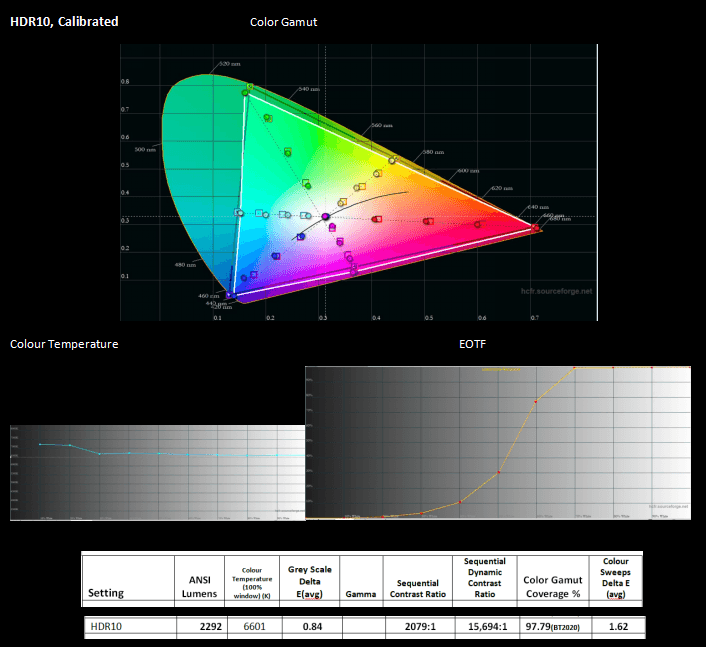
今回も、Pro2 に同梱のキャリブレーションツールが真価を発揮し、優れた結果をもたらしました。上記の色域は、輝度 50% のパターンで測定しています。このキャリブレーション設定のまま、輝度が維持されるかを確認するために、続いて 100% の色で色域を測定しました。
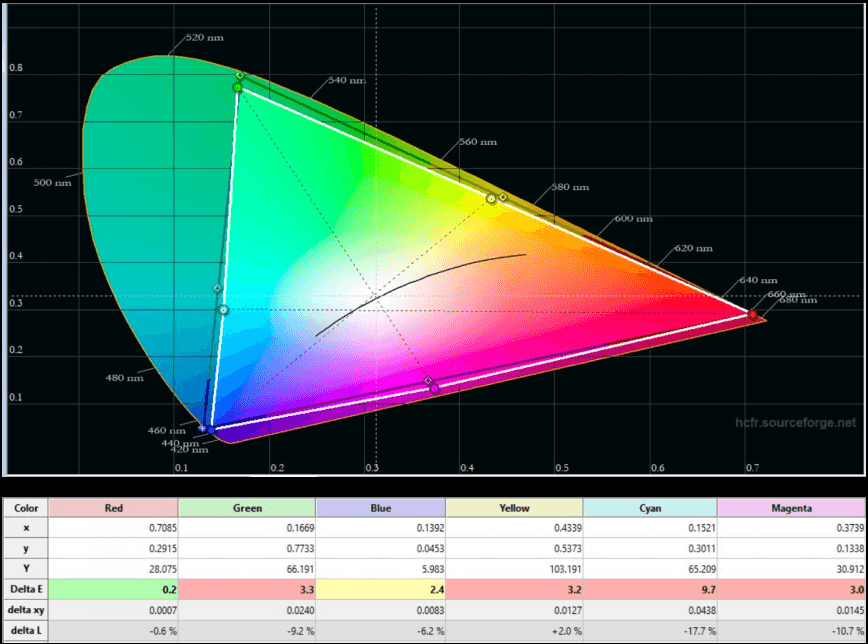
確かに、色域全体の輝度は非常に良好に維持されています。
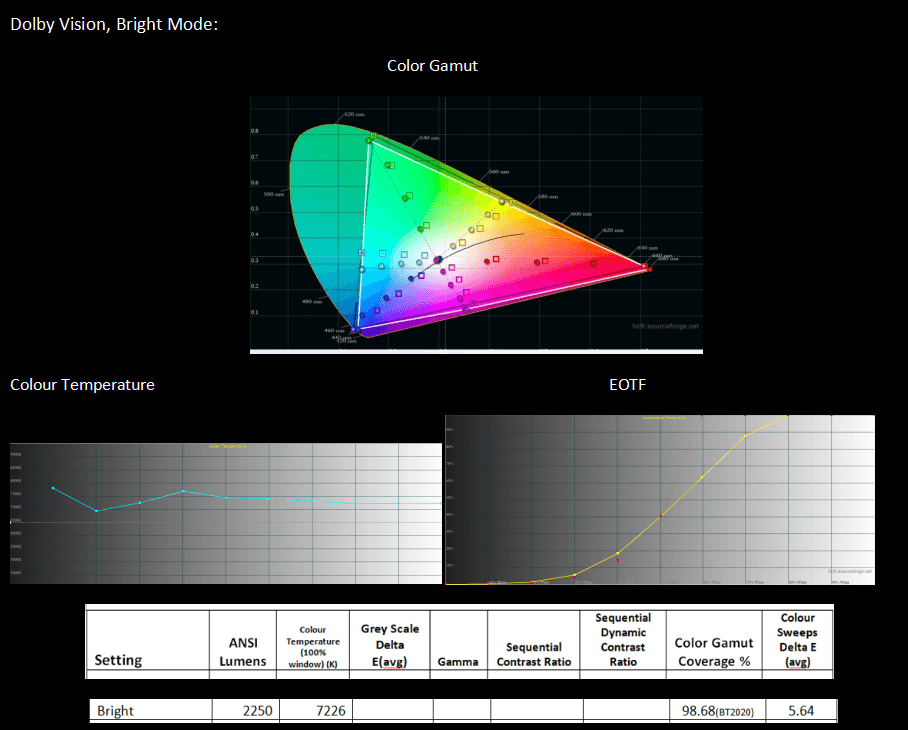
今回も結果は良好ですが、改善の余地はあります。幸い、Dolby Vision を微調整するためのコントロール(Gamma 20 point を除く)も一通り利用可能です。
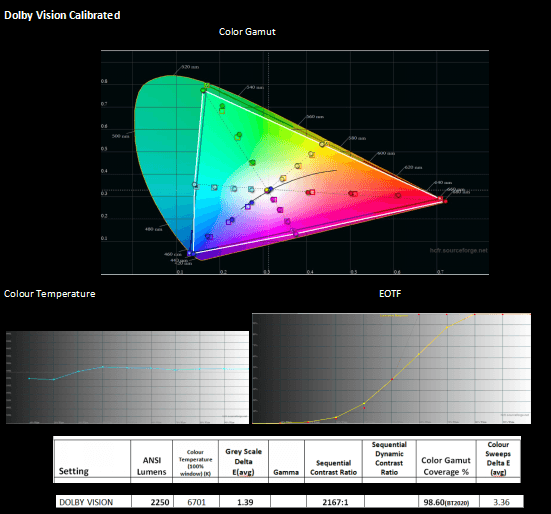
Dolby Vision を HDR10 ほどの精度には調整できませんでしたが、結果は非常に良好です。一部の色では、輝度値の最適化が難しい場面がありました。とはいえ、最終的には見栄えの良い Dolby Vision 映像に仕上がります。なお、Pro2 には 80-150インチに設定できる画面サイズ設定があり—これは Dolby Vision のトーンマッピングの精度に影響します。
HDR性能 & DTM
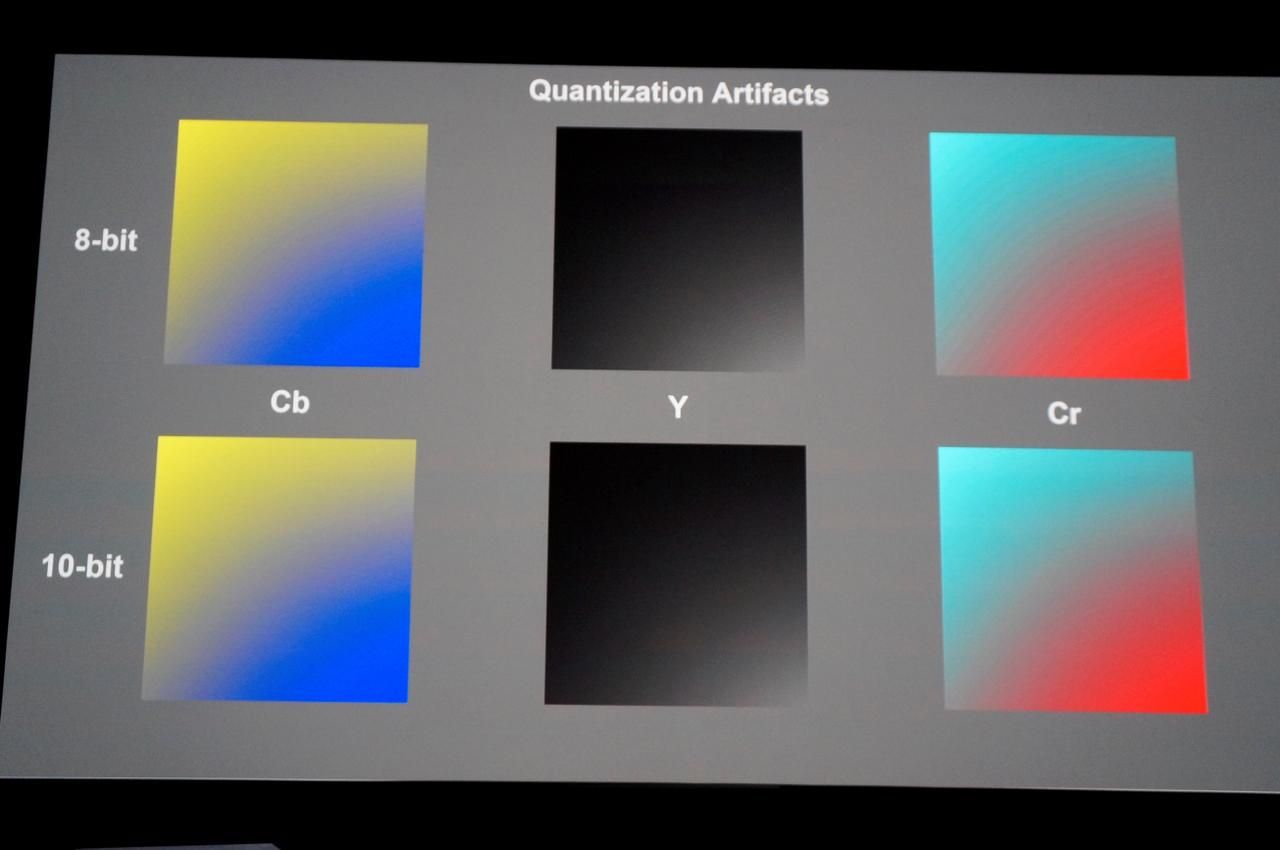
HDR 規格では色深度が 10 ビットに移行し、色間の階調がより滑らかになります。以下は、ディスプレイ機器が 10 ビットカラーをどれほど滑らかに表示できるかを確認するテストです。理想的には、10 ビットのパターンが可能な限り滑らかで、バンディングがないことが望ましいです。下の写真では、目立つバンディングはありません。付け加えると、画面に鼻をつけるほど近づいて見ると、Cr ウィンドウにわずかなバンディングの気配があり、Y と Cb はクリーンでした。視聴中にバンディングを検出できるかどうか細心の注意を払って確認しました。Spears & Munsils のデモ映像にある澄んだ青空のシーンは、バンディング検出の厳しいデモテストとして非常に有効です。結果として、バンディングは一切見られず、その後もさまざまな素材を数時間視聴して、やはりバンディングは検出されませんでした。
プロジェクターの輝度には限りがあるため、その補償としてHDRコンテンツはトーンマッピングが必要です。プロジェクターにおけるHDRトーンマッピングの仕上がりは、従来から結果に大きなばらつきがありました。正確なトーンマッピングはHDRコンテンツの視聴体験を大きく左右します。Pro2は、動的トーンマッピング対応の2つのフォーマットであるHDR10+(Pro2はHDR10+モードでTheater、Standard、Vividの3つの設定を提供)とDolby Visionに対応しているほか、HDR10向けに独自のダイナミックトーンマッピング(DTM)を内蔵しています。ホームシアター用プロジェクターでは、DTMはいわば“贅沢”な機能とされてきましたが、Pro2に搭載されているのは評価できる大きな利点です—とりわけ、以下の比較例に見られるようにその性能が高い点が挙げられます:
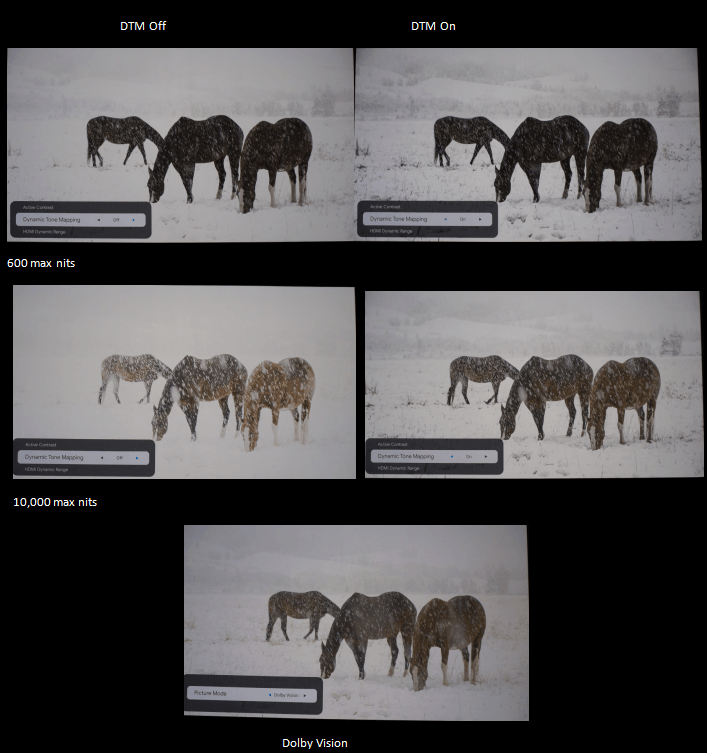
このダイナミックレンジの過酷なテストショットは、DTM がどれほど優れているかを示しています。明るい雪の部分で保持されるディテール量は、DTM なしおよび Dolby Vision と比較しても際立っており、10,000 max nit レベルでも同様です。
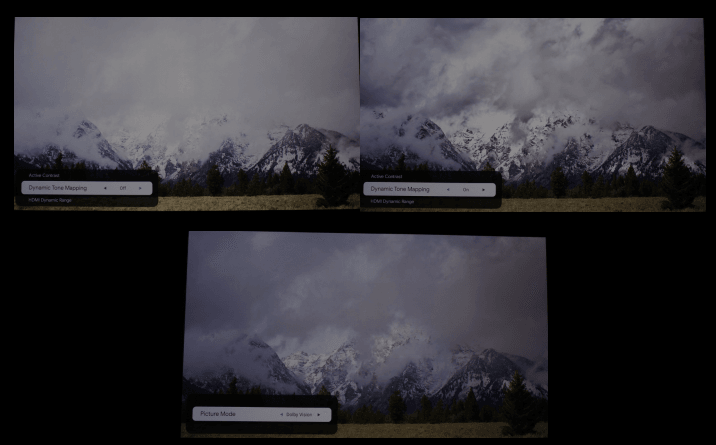
この例でも同様の結果が確認できます—ハイライトのディテールが保持され、DTMをオンにしたシーンはすぐにより自然に見えます。
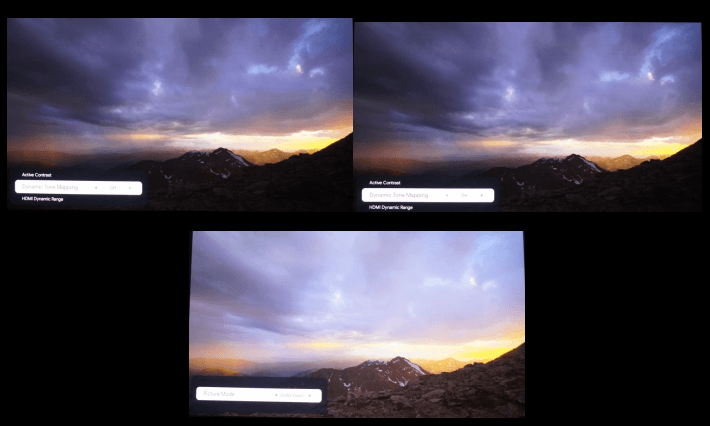
このショットが私には最も印象的でした。ここに掲載した写真では控えめに見えますが、実際にはとても明らかで、画像の右側に沈みゆく太陽があります。DTM をオフにするとほとんど見えず、DV では完全に白飛びし、DTM をオンにするとはっきり確認できました。上のショットは、DTM がハイライトのディテールを引き出すだけでなく、シャドウでも同様であることを示しています。山肌のディテールが増していることからも分かるとおりで、これも写真より実際の方がより明瞭です。
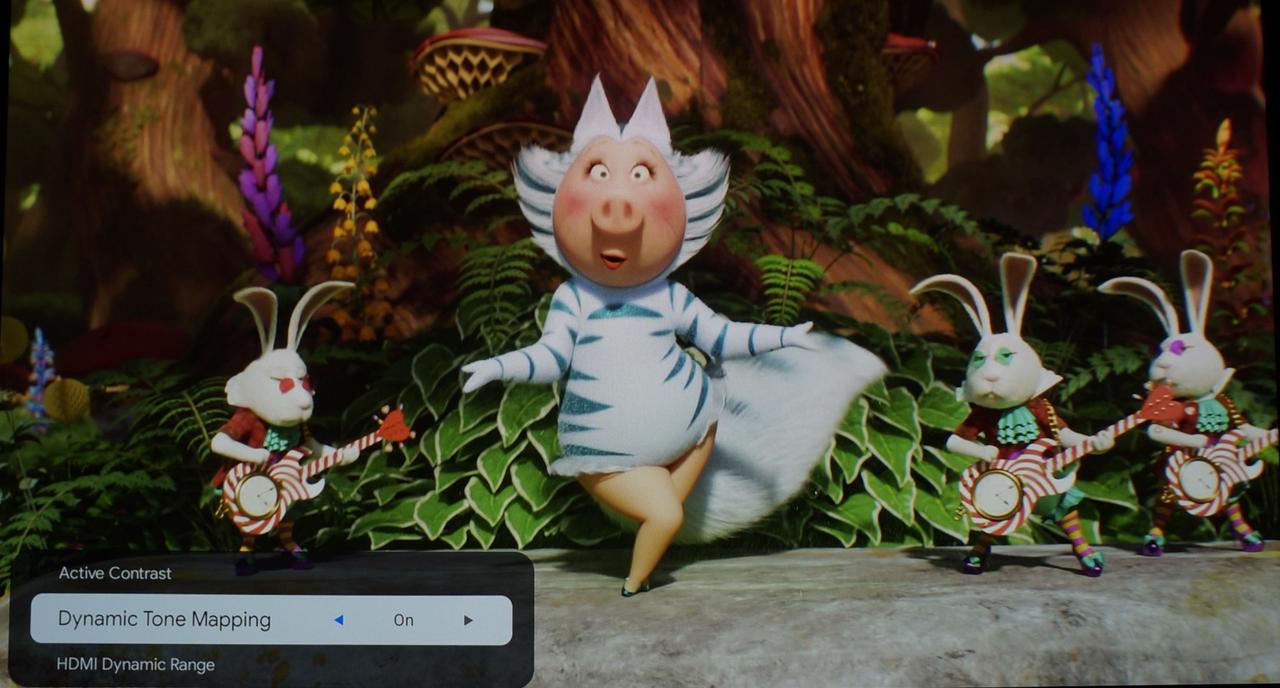
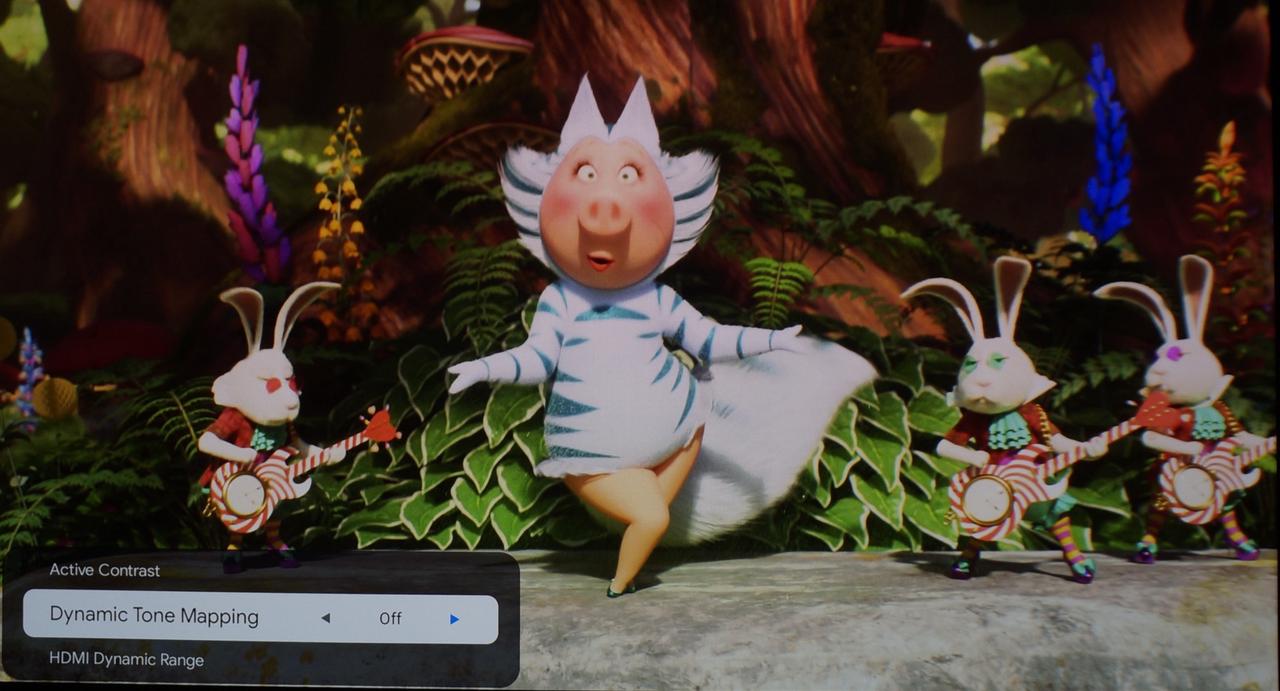
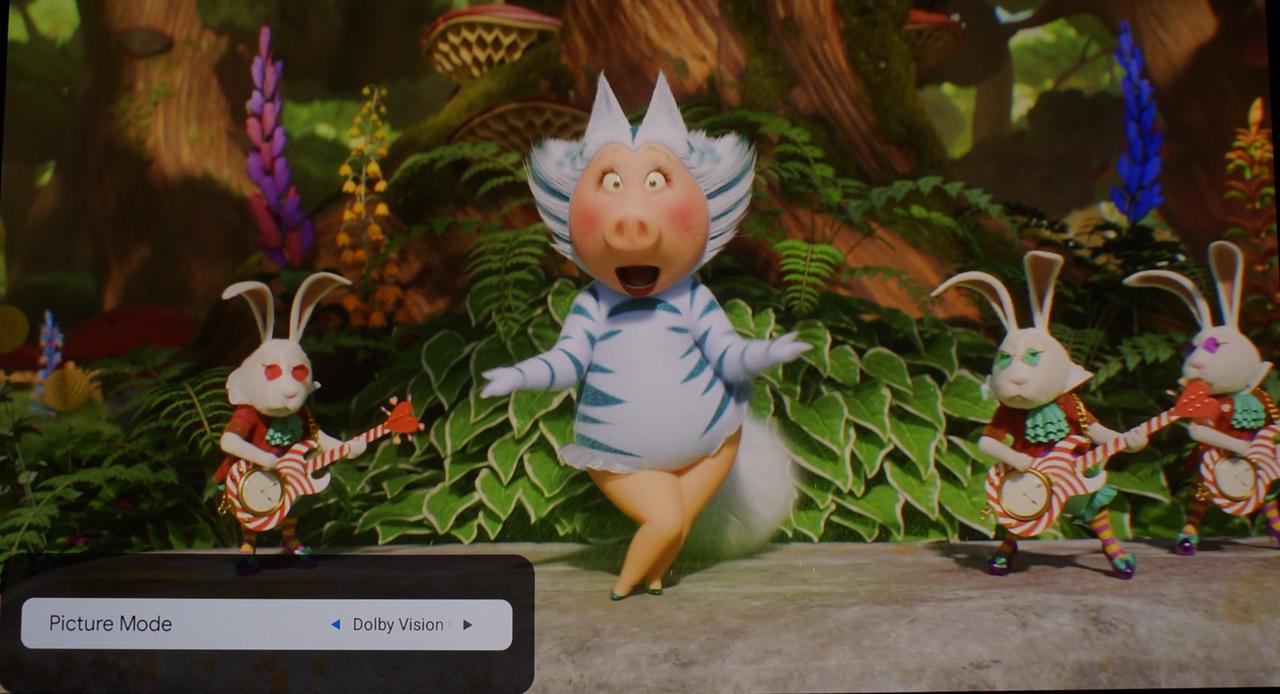
姪たちが Sing の映画を紹介してくれて(おそらく彼女たちより私のほうが楽しんだと思います)—Rosita を見ると、両頬にヒゲが描かれています。DTM off ではほとんど見えませんが、DTM On および DV では見えるようになります。同様に、彼女のキャットスーツと耳は DTM off では一様な白に見えますが、DTM On および DV では微妙なテクスチャやディテールが見えます。
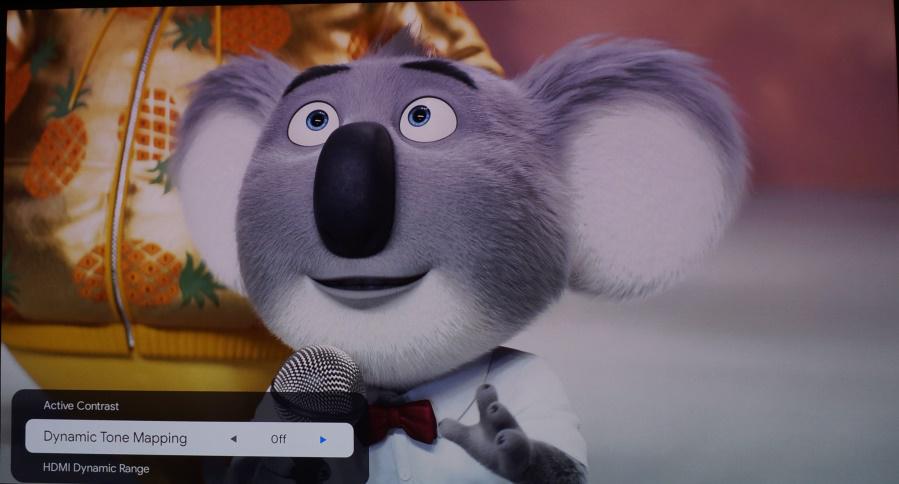
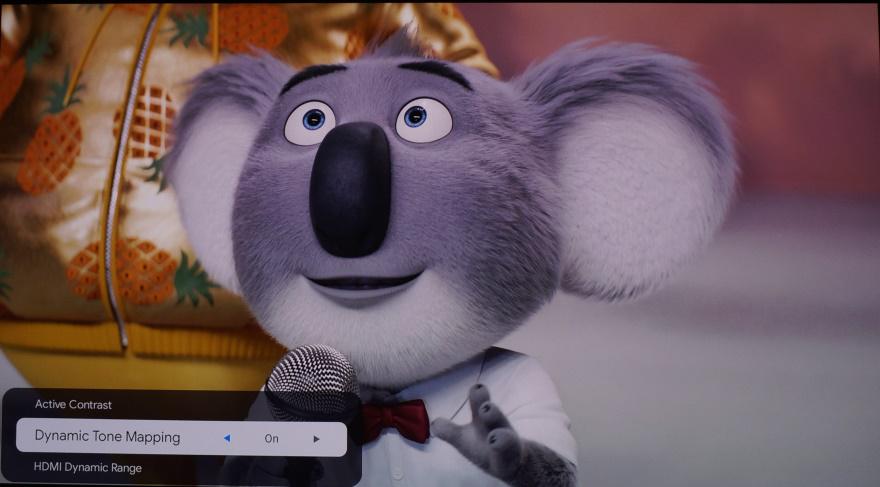
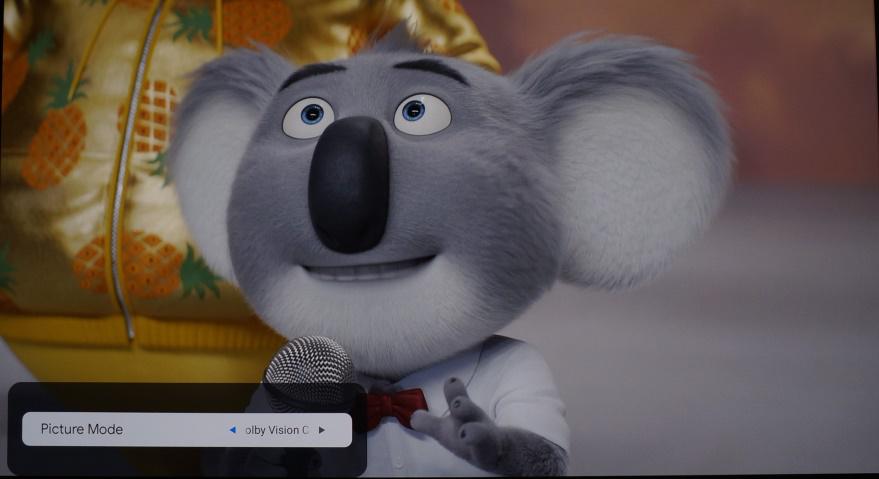
上の Sing の2枚のショットに見られるホワイトバランスの問題はご容赦ください—なぜ私のカメラが正しく再現できなかったのか分かりません。DTM をオンにして DV の場合、Buster Moon の白い毛並みのあらゆるディテールが見えます—特に顎や耳の中がよく分かります。DTM をオフにすると白飛びし、柔らかな白い空白のようになります。
ご覧のとおり、DTM の追加は大きな違いを生みます。Pro2 の性能に合わせてシーン内ダイナミックレンジを調整し、シーンごとにすべてのディテールが見えるようにします。映像はより自然で、よりリアルになります。
最後に、EBL と DTM が連携して動作するシーケンス—これは容易ではないソフトウェア実装だと思います。
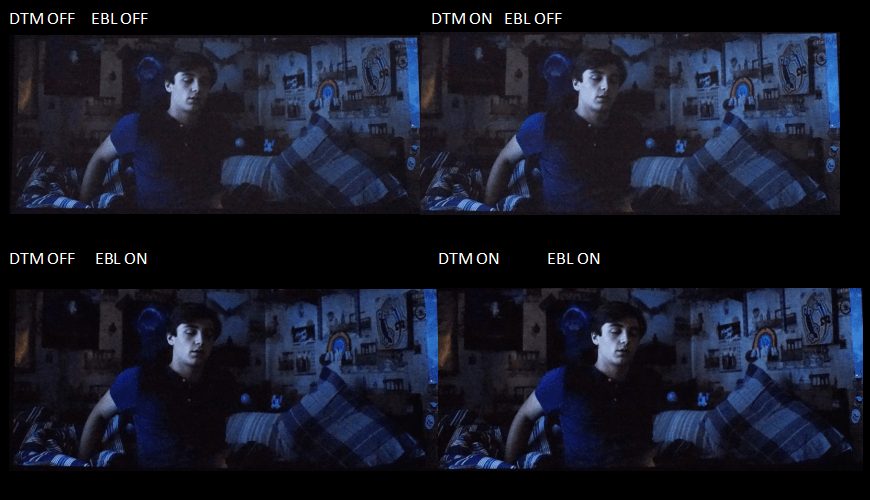
こちらのソフトウェアエンジニアリングチームに敬意を表します—この2つの機能が相乗的に機能し、非常に難しい低 APL のシーンを効果的に強化します。EBL + DTM は、プロジェクターのネイティブコントラスト範囲全体にわたってシーンのコントラストを最適に調整しているようです。
ディスカッション
Standard throw DLP enthusiasts have been waiting a long time now for a fix to low contrast 4K projectors. We have seen countless offerings, but little progress. Finally, I can say, Valerion has thrown us a bone, a bone with a lot of meat on it. Working within the confines of hardware limitation, they have squeezed out the most performance so far in terms of an affordable, DLP projector. They have patched up that hole that DLP has in low APL scenes, while maximizing the usual DLP tri-laser strengths—bright, punchy, colourful razor sharp images. One can now watch an entire movie or show and enjoy consistently beautiful images, regardless of APL level. Yes, there may be an occasional artifact here and there in the EBL to achieve this, but as witnessed in the Agatha scene compared to my current projector, it takes what is otherwise a dull and flat image to one that is so vibrant and rich-full of depth. It has been said so many times on this thread but I am fine to repeat it—it is very hard to believe just how much performance the Pro2 brings to the table, considering where it is priced at. In my 25 years of following projection technology, I do believe the Pro2 represents the pinnacle of performance to price ratio. It truly is a good time to be a home theatre lover.
まとめ
I would like to commend Valerion for bringing some excitement back to the traditional throw DLP community-they have given enthusiasts something to be enthused about. Sure, the Pro2 is targeted as a Lifestyle projector. Yes, the throw ratio could be greater. No matter--considering the phenomenal images it can produce, we will make it work for us, happily. I do believe Valerion has heard us. They must have, considering that, as I type this, the Kickstarter campaign is closely approaching $10,000,000 Cnd, with over 3000 backers. And I hope Valerion continues to hear us. There still is room for improvement. The Max will be coming mid next year and hopefully after that, they can offer us an extensive traditional throw line.
The year was 2001 when I first saw a full HD image projected by a 64” Zenith IQB64W10W. It was deservedly on a pedestal in a local ma and pa Electronics shop, back when they still existed. It was showing a sequence of nature shots, kind of a prehistoric Spears and Munsil Montage. For the first time in my life, I felt like I was no longer looking at a display, but out of a window. That feeling has returned when viewing the Pro2—its images are just that good.
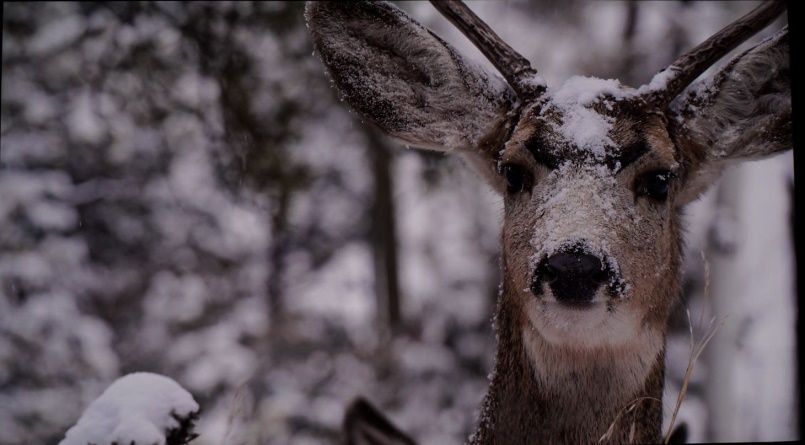
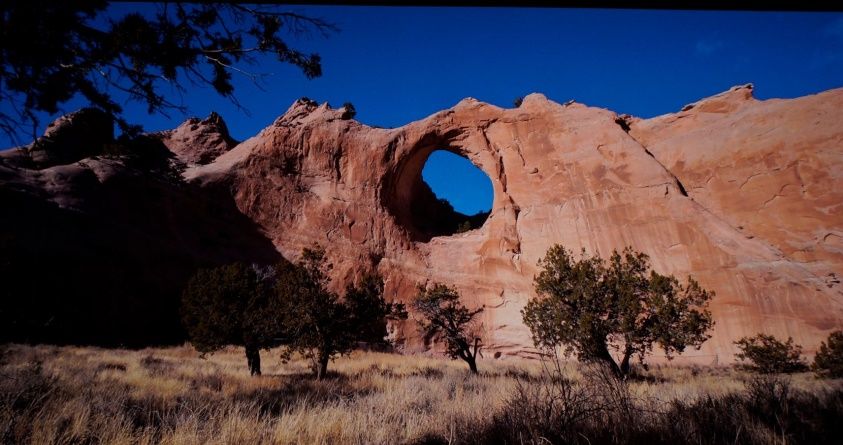
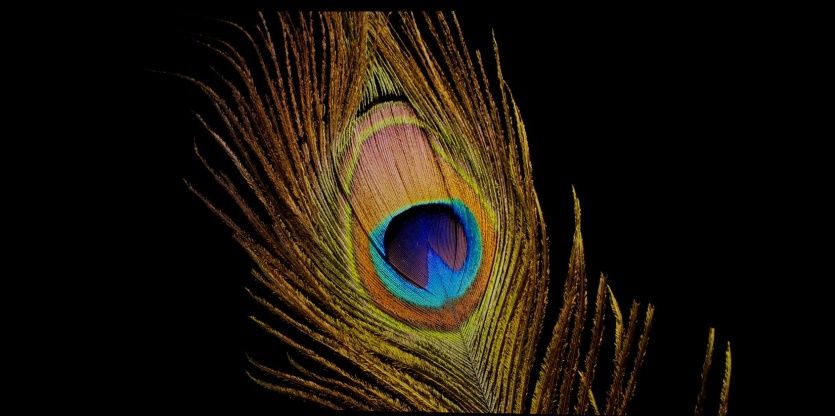
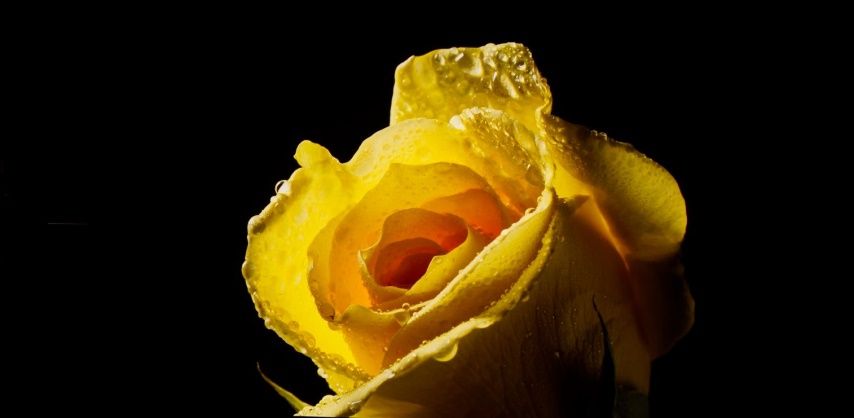
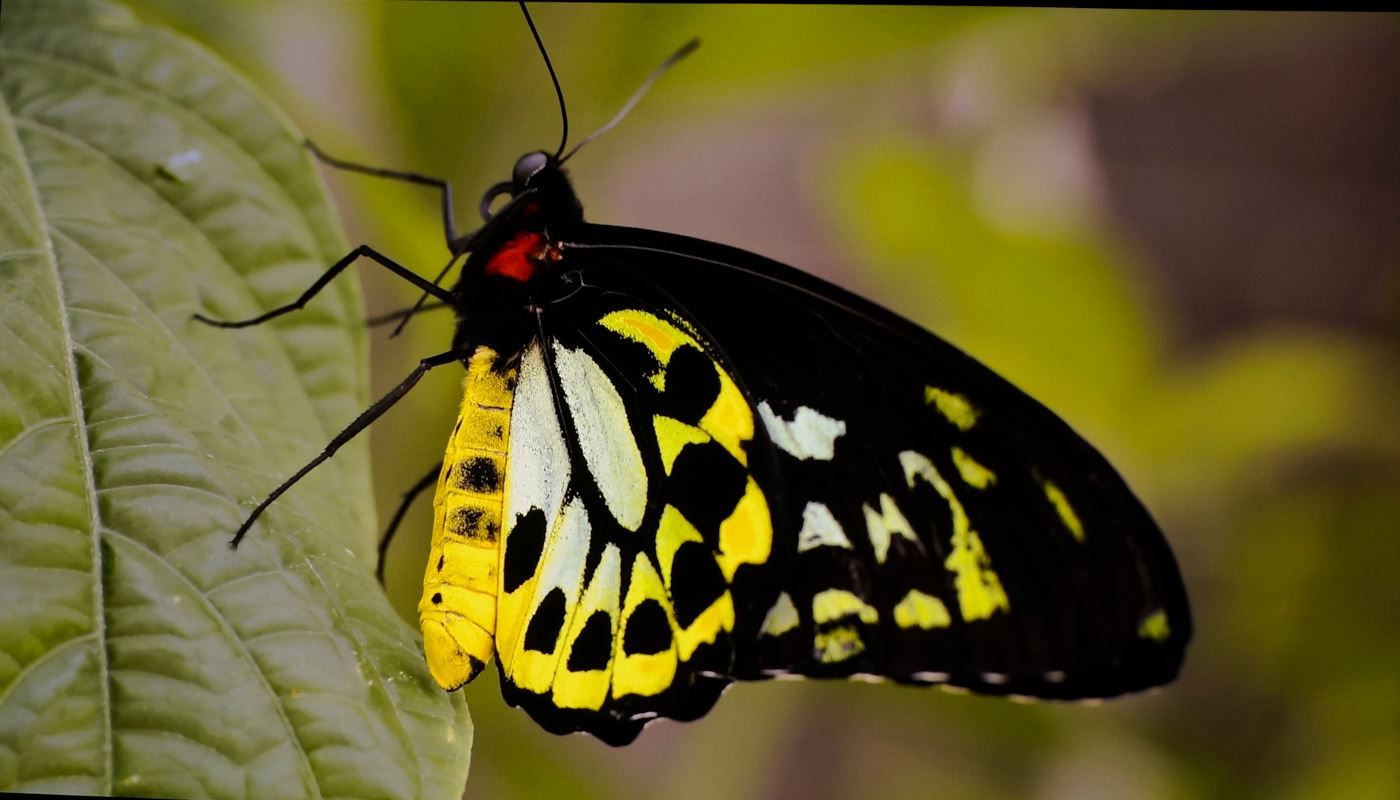
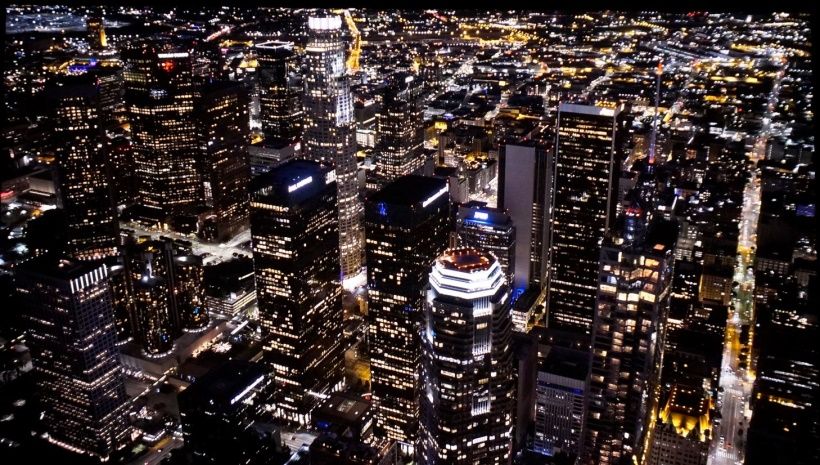
The IQB weighed 390 lbs and barely fit through my doorway. The Pro2 weighs 15 lbs and can fit under my arm. Which brings us to the question in our title, “Can Good Things Really Come in Small Packages?” The Pro2 is proof that indeed good things, no, great things do come in small packages(as all you Kickstarter backers will soon find out!)And, finally, below, a collection of photos from the well-known S&M demo clip, (retinal rush only possible when viewed on screen, in person) :


称賛に値する特長
- ~2,300 校正済みルーメン
-高精細な4K映像-高品質の電動ズームレンズ
-BT2020 色域をフルカバー- 輝度 100% においても
-先進的な EBL レーザー調光
-非常に効果的な HDR10 ダイナミックトーンマッピング
-優れた画面均一性
-レーザースペックルゼロ(Cinetension ホワイトスクリーン上で)
-低 RBE
-完全な CMS/GS コントロールにより、非常に高精度なキャリブレーションが可能
-24p映像を正しく処理
-標準投写の 0.47” XPR DMD 向けの良好なシーケンシャル/ネイティブのコントラスト比
-ささやき声のように静か
-Dolby Vision 対応
-3D対応
-OTA ファームウェア対応予定
ほしい物リスト
-シーケンシャル/ネイティブ コントラスト比の向上
最適なキャリブレーション設定
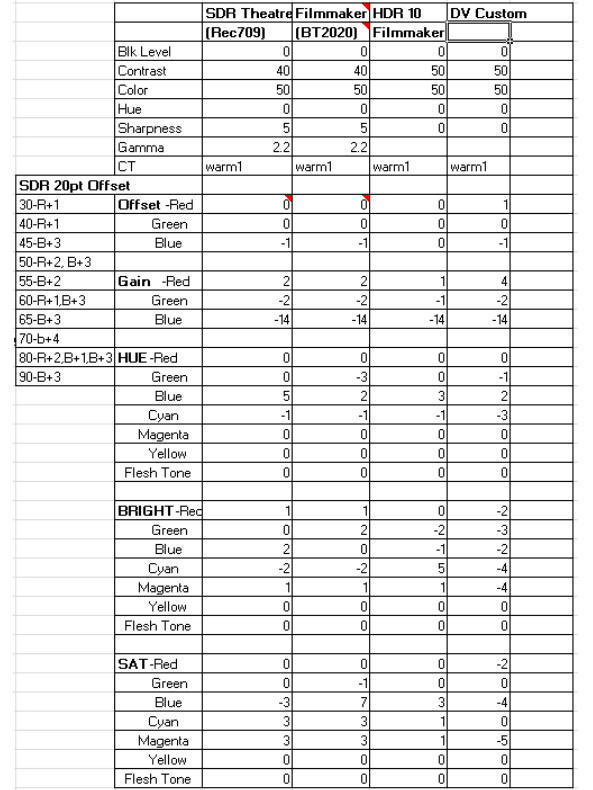
以下は、較正結果を得るために使用した設定です。共有いたしますが、これはエンジニアリングサンプルで達成したものであり、量産品とは異なる可能性があります(量産品間でも個体差が生じる場合があります)。また、これらは無地の白いスクリーンでの検証結果であることをご留意ください。
インサイトをもっと見る→ もっと見る